Draw your processes in the browser. Upload to the server you already have.
ProcessTrek is a drop-in replacement for the Process Designer Visio add-in. It reads your existing processes, lets you edit them on a modern canvas, and uploads the same ESIWorkflowModel XML. Your processes and server configuration stay as they are: ProcessTrek installs as a single jar in your Case360 web application.
No Visio license.
No 32-bit ActiveX controls.
No migration to your processes or change in case360 server configuration.
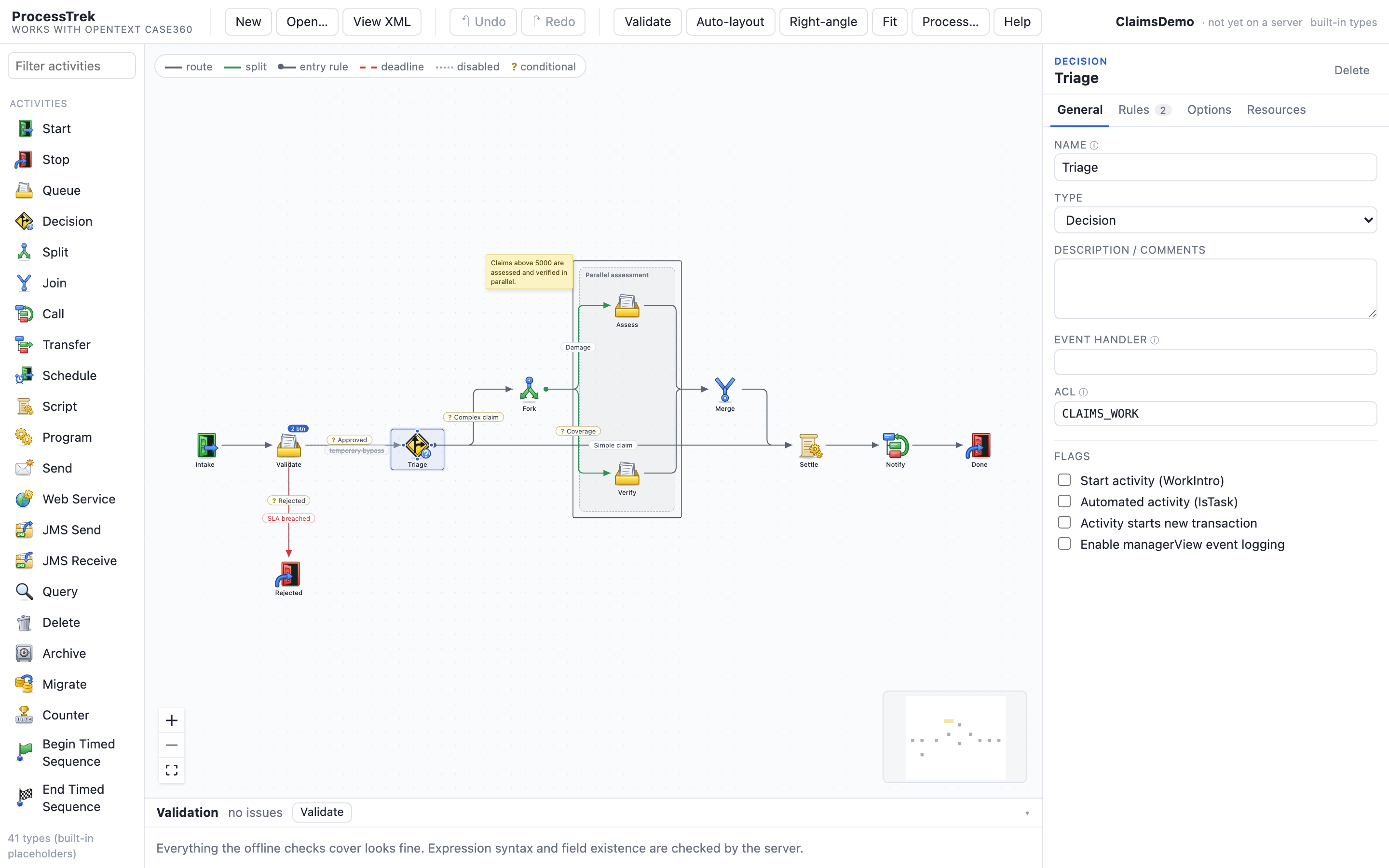
Same output. Better place to work.
Open what you already have
Open an existing process from server, and both the process and its layout come across, recovered from the existing Visio file. Every rule, comment and flag survives. Everything else in the package is left exactly as it was. Once you start working in ProcessTrek, no VSD file is uploaded to the server anymore: the layout is stored as a JSON file in place of the VSD.
Catch mistakes before the server does
Split and Join pairing, unattached connectors, unreachable targets and illegal names are checked as you draw. Click an issue to jump to the step. Expression syntax is still confirmed by the server's own rule check.
See the XML before you upload
View XML shows the exact ESIWorkflowModel that will be sent, including the rules each activity type adds on upload. Diff it against what Process Designer produces and decide for yourself.
Cheaper, simpler and more secure than the Visio add-in
The Process Designer add-in only works with 32-bit Visio, and getting it installed and working is often the hardest part. ProcessTrek runs in the browser, so you skip the desktop add-in installation and the Visio licence for every designer: Visio Plan 2 lists from about €13 per user per month, roughly €150 per designer per year before VAT.
The add-in also needs you to keep an HTTP endpoint running with basic authentication, which is a security problem. ProcessTrek talks to your server over HTTPS and uses the server’s own authentication.
Everything you do in Process Designer
| Process Designer | In ProcessTrek |
|---|---|
| Open a process (.vsd or from server) | Open a VSD process, from local PC or server. Sonora export, ESI XML or a saved design file, with layout recovered |
| Configure Stencils and activity types for each user | Palette pre-generated |
| Rules tab: Entry, Exit, Deadline | Rule editor per phase with add, reorder, enable and disable |
| Connect activities with ROUTE TO and SPLIT TO | Draw an edge; the matching rule is created in the right phase |
| Split and Join handling, SplitGroup | Pairing analysis, forced rules and SplitGroup applied at compile |
| Dispatch buttons and Queue options | Dedicated Dispatch tab for Queue and Start activities |
| Validate and View XML | Local and server validation , XML preview and server rule check |
| Upload as new version or overwrite | Same upload through Rest API |
Three steps, no migration project
Open
Open a process directly from the server, or load a Visio.vsd file. Process definition and layout extracted
Edit
Drag activities, draw connectors, edit rules per phase. Undo and redo everything.
Upload
Validate, preview the XML, then upload as a new version or overwrite.
Security and data
HTTPS and your own sign-in
ProcessTrek talks to your Case360 server over HTTPS and uses the sign-in you already have. The Visio add-in needs an HTTP endpoint with basic authentication. ProcessTrek does not.
No Visio files to upload
Once you start using ProcessTrek, no VSD file is uploaded to the server any more. The layout is stored as a JSON file in place of the VSD.
Your data stays with you
Your licence key is checked in your browser and is never sent anywhere. In the live demo, files you open are read on your own computer and are not uploaded.
Compatible with OpenText Case360 Workflows
Case360 11.x
Open, edit, validate and upload processes on Case360 11.x servers.
Case360 12.x
Open, edit, validate and upload processes on Case360 12.x servers.
Case360 14.x
Open, edit, validate and upload processes on Case360 14.x servers.
ProcessTrek is an independent product and is not affiliated with, endorsed by or supported by OpenText.
One fixed price, support included
Questions about replacing Process Designer
What is a browser-based alternative to Case360 Process Designer?
ProcessTrek is a browser-based alternative to the Visio-based Process Designer add-in for OpenText Case360 (Sonora). It reads and writes the same ESIWorkflowModel XML, so you design Case360 processes in a web browser instead of Visio and upload them to the server you already run.
Do I need a Case360 migration project to switch from Process Designer?
No. ProcessTrek opens your existing Case360 process exports, Sonora packages and Visio .vsd files, and writes the same XML back, so there is no data migration and no change to your server configuration. You can try it without installing anything in the live demo.
How does ProcessTrek compare with Process Designer?
It covers the same everyday functions: open and edit processes, validate them before upload, view the generated XML and upload to the server. It adds a modern browser editor with no Visio licence or Windows desktop needed.
How much does ProcessTrek cost?
EUR 100 per JVM per year, support included. The licence runs for one year and does not renew automatically. Tax is calculated at checkout.
How do I install ProcessTrek?
Copy the supplied jar into the WEB-INF/lib folder of your Case360 (Sonora) web application and restart. Full steps are on the install and support page.
Send us one process. We'll send back the diff.
Share a Sonora export and see it open, validate and compile, with the generated XML next to your current one.